Wonderbar: A Whimsical Script Handwritten Font for Playful Web Design
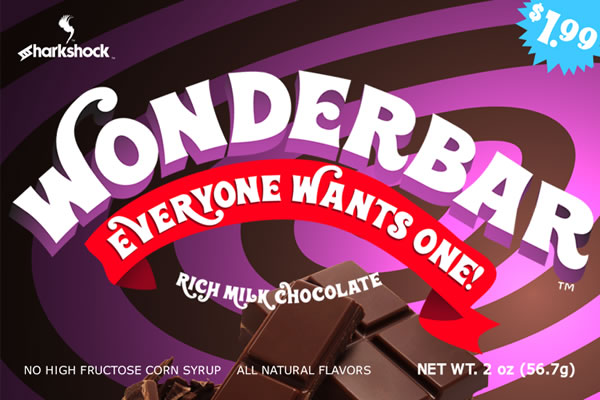
If you are looking to inject a sense of nostalgia and joy into your digital projects, Wonderbar is the perfect addition to your design toolkit. This mouth-watering display font captures the whimsical feel and style of being a kid in the 70s, offering a unique visual personality that stands out in crowded digital spaces. As a web designer, I have found that selecting the right typeface can make or break a user’s first impression, and Wonderbar delivers exactly what modern brands need: character, warmth, and immediate engagement.
Why Wonderbar Enhances Landing Page Hero Sections
The hero section of any landing page is prime real estate, and using Wonderbar here immediately sets a tone of fun and creativity. Unlike sterile corporate sans-serifs, this script handwritten font invites users to pause and engage. When paired with bold imagery or vibrant backgrounds, Wonderbar acts as a visual hook, drawing the eye to your headline before they even read the subtext. For creative portfolios, boutique online stores, or coaching websites, this font signals that the brand approachable and human-centric. Its retro-inspired curves evoke the carefree spirit of the 1970s, making it an excellent choice for brands that want to appear established yet playful. By integrating Wonderbar into your primary heading, you create an emotional connection with visitors, encouraging them to explore further rather than bouncing off a generic interface.
Optimizing Visual Hierarchy with Display Fonts
In web design, visual hierarchy guides the user’s eye through content in order of importance. Wonderbar excels as a display font for high-impact moments, such as call-to-action (CTA) areas, section headers, or promotional banners. Because it is a decorative script, it should not be used for body copy; instead, let it shine in short phrases where its legibility is maximized. For instance, use Wonderbar for a "Shop Now" button on a lifestyle blog or a "Book a Session" header on a freelancer’s site. The contrast between the flowing script and clean, geometric buttons creates a dynamic tension that feels intentional and polished. This strategic use of weight and style helps users scan the page efficiently, identifying key actions without feeling overwhelmed by text density.
Wonderbar for Digital Product Branding and Templates
For digital product creators selling templates, courses, or printables, consistency is key to building trust. Wonderbar provides a distinctive brand voice that can unify various assets, from email newsletters to social media graphics. When designing a digital course sales page, using this font for module titles or success stories adds a layer of personality that generic fonts lack. It transforms standard layouts into branded experiences. Since Wonderbar includes basic Latin characters and punctuation, it is versatile enough for various English-language marketing materials. However, designers must be mindful of spacing; the whimsical nature of the letters requires generous line height and letter spacing to maintain readability on smaller screens. Proper kerning ensures that the font retains its elegant flow without appearing cluttered, which is essential for maintaining a professional aesthetic in digital products.
Pairing Wonderbar with Sans Serif Body Copy
To balance the decorative nature of Wonderbar, pair it with a simple, highly readable sans serif font for body text. This combination leverages the strengths of both typefaces: the script captures attention and emotion, while the sans serif ensures clarity and ease of reading. Imagine a website for a handmade jewelry store where the logo and main headings use Wonderbar, but the product descriptions and checkout forms rely on a clean geometric sans. This contrast prevents visual fatigue and allows users to focus on the information they need. The juxtaposition of the retro script against modern typography creates a contemporary editorial design feel, bridging the gap between nostalgia and current web standards. This pairing strategy is particularly effective for SaaS founders or marketers who want to humanize their technical offerings.
Mobile Responsiveness and Readability Considerations
With mobile traffic dominating web usage, ensuring that Wonderbar performs well on smaller devices is crucial. While display fonts look stunning on desktop monitors, they can become illegible if scaled down too far. Designers should test Wonderbar at various breakpoints to ensure that headlines remain clear and impactful. On mobile screens, consider reducing the font size slightly or increasing the contrast against the background color. Dark backgrounds with light script text, or vice versa, work best to maintain visibility. Avoid placing Wonderbar over busy image overlays without sufficient opacity masks or shadows, as the intricate details of the handwritten style may get lost. By prioritizing accessibility and responsive behavior, you ensure that the whimsical charm of the font reaches all users, regardless of their device.
Enhancing Conversion-Focused Layouts
Conversion rates improve when users feel an emotional resonance with the brand. Wonderbar taps into feelings of nostalgia and joy, which can lower barriers to purchase or sign-up. Use this font strategically in testimonials, limited-time offer banners, or thank-you pages to reinforce a positive user experience. For example, a "Thank You for Your Order" message in Wonderbar feels more personal and celebratory than a standard system font. This subtle psychological nudge can increase customer satisfaction and encourage repeat business. Additionally, using the font for error messages or empty states can soften the blow of negative interactions, keeping the overall brand tone friendly and supportive. In the competitive landscape of e-commerce and digital services, these small typographic choices contribute significantly to a cohesive and persuasive brand identity.
Licensing and Implementation for Commercial Projects
When incorporating Wonderbar into client websites, online stores, or commercial templates, always verify the licensing terms. Most premium fonts require specific licenses for web embedding, app development, and commercial distribution. Ensure that you have the correct webfont files (.woff, .woff2) to guarantee fast loading times and cross-browser compatibility. The inclusion of basic Latin support means it works seamlessly for most Western markets, but check for extended character sets if targeting international audiences. Proper implementation involves uploading the font files to your server or using a CDN, then referencing them in your CSS with @font-face rules. This technical step ensures that the whimsical style of Wonderbar renders consistently across all browsers, preserving the integrity of your design. By adhering to licensing agreements and best practices, you protect your project legally while delivering a high-quality typographic experience.
Building a Cohesive Creative Font Kit
A strong brand identity relies on a consistent application of design elements. Integrate Wonderbar into a broader kit that includes complementary colors, imagery styles, and spacing guidelines. Use the font sparingly to highlight key moments in the user journey, such as navigation links, footer credits, or special announcements. This restraint prevents the design from becoming overwhelming and maintains a sophisticated look. Whether you are designing a blog header, a digital ad, or a portfolio site, Wonderbar offers a reliable way to infuse personality into your work. By treating the font as a strategic asset rather than just decoration, you create web experiences that are not only visually appealing but also effective in communicating your brand’s unique story.